

Scaling
Platformatic ICC supports autoscaling applications on both Kubernetes and AWS ECS. It adjusts the number of application instances based on Node.js runtime signals and configured safety limits.
Application instances
Section titled “Application instances”An application instance is one independently scaled copy of a Watt application—for example, a Kubernetes pod or an AWS ECS task. Throughout this section, instance refers to this application copy, rather than an underlying compute host or a worker running inside Watt.
ICC provides two scaler versions, selected for the whole ICC deployment with PLT_SCALER_ALGORITHM_VERSION.
| Version | Availability | Behavior |
|---|---|---|
| Reactive scaler (V1) | Open Source and Enterprise | Reacts to current Event Loop Utilization (ELU) and heap pressure. |
| Predictive scaler (V2) | Enterprise | Forecasts short-term ELU and heap load and provisions capacity before the forecast crosses a threshold. |
The two versions are alternatives: ICC runs either V1 or V2. They do not run together.
Enterprise deployments using V2 also include the Planner. The Planner learns recurring capacity requirements and lets operators schedule minimum instance counts before expected demand. It complements the live V2 scaler; it is not a third live-scaling algorithm.
How scaling fits into ICC
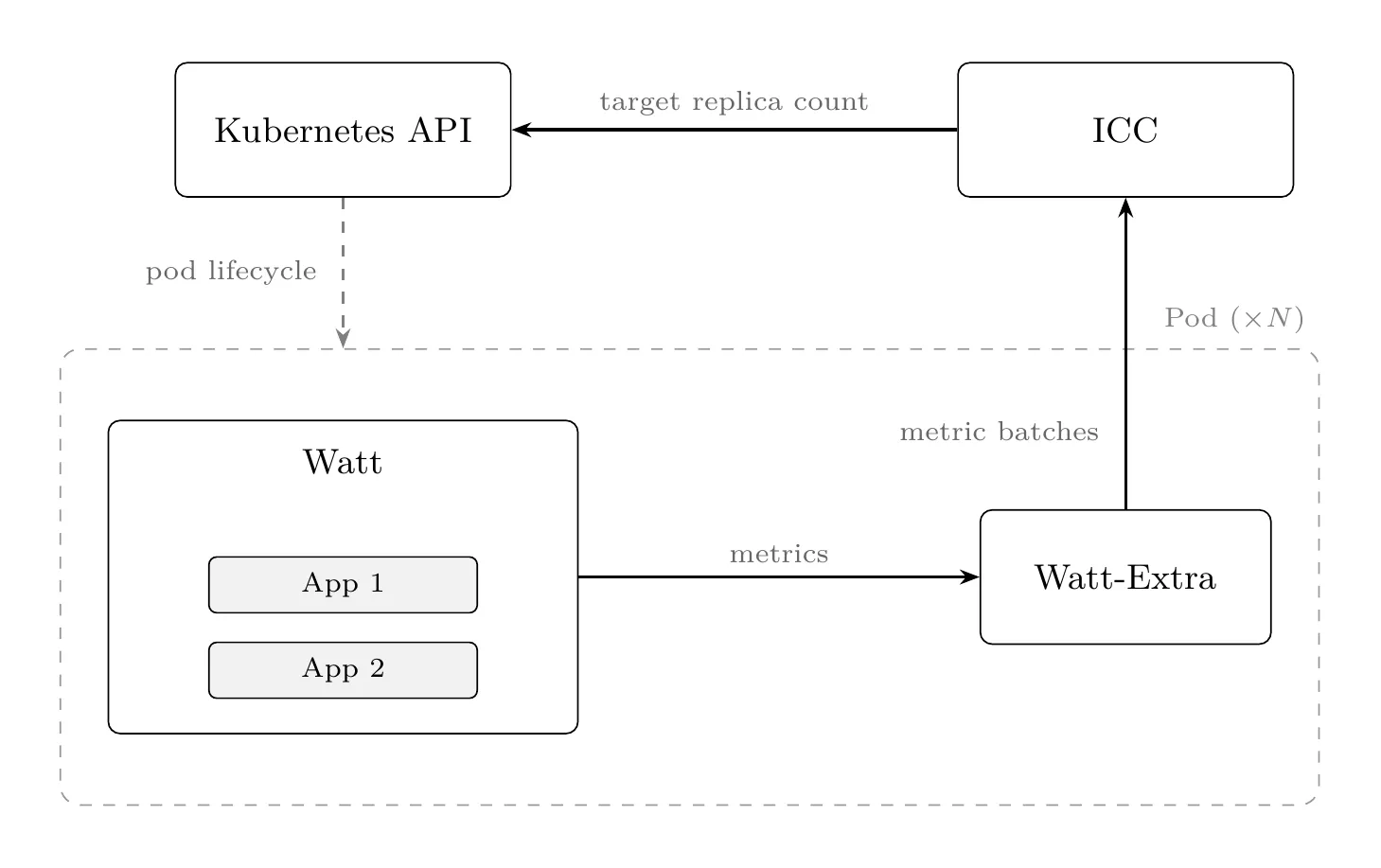
Section titled “How scaling fits into ICC”@platformatic/watt-extracollects application-level runtime signals from each Watt instance.- The selected scaler evaluates those signals and calculates a target instance count.
- ICC applies minimum and maximum instance limits.
- The Machinist service updates the application’s desired instance count through the infrastructure provider.
- ICC records scaling events and exposes their reasons and metrics in the dashboard.
The following diagram shows the high-level real-time scaling data flow on Kubernetes. Each Watt pod sends runtime metrics through Watt Extra, and ICC applies the resulting replica target to Kubernetes.
Select the scaler version
Section titled “Select the scaler version”V1 is the default:
PLT_SCALER_ALGORITHM_VERSION=v1Enterprise deployments can select V2:
PLT_SCALER_ALGORITHM_VERSION=v2Restart ICC after changing the algorithm version. Applications must meet the Watt Extra and Platformatic Runtime version requirements.
Next steps
Section titled “Next steps”- Verify the scaling prerequisites.
- Configure scaling limits for each application.
- Learn how the Reactive scaler (V1) makes decisions.
- Learn how the Predictive scaler (V2) forecasts load.
- Configure recurring capacity with the Planner.
- Review all scaler configuration variables.